About Chroma Jam
Tap blocks off a crowded tray and send each colour to its own side rack before the five-minute clock runs out.
A timed colour-clearing puzzle: tap blocks off a tray and send each colour to its own side rack, with five minutes on the clock.
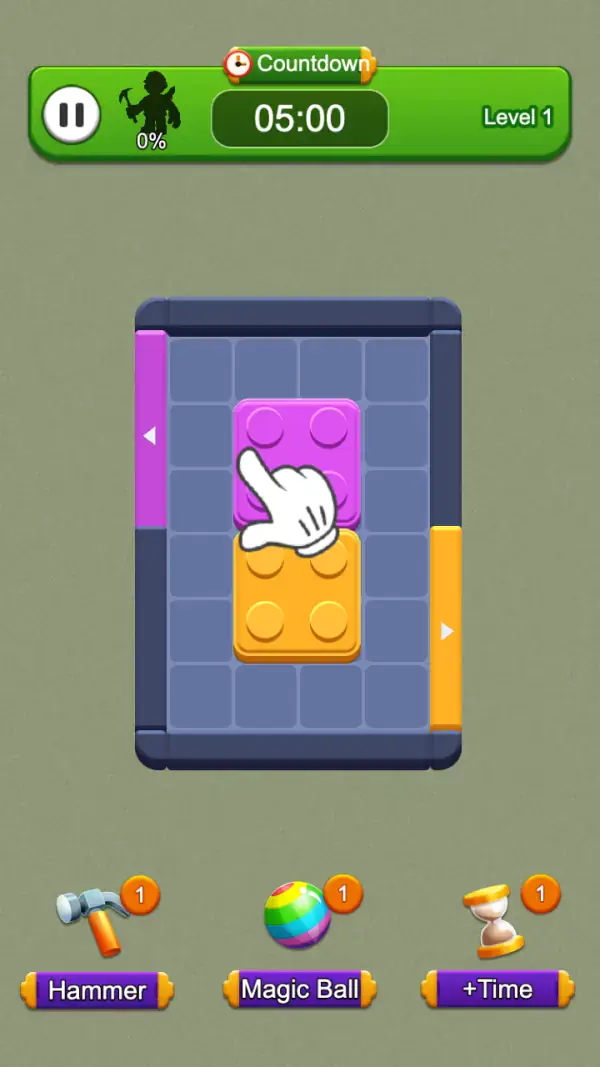
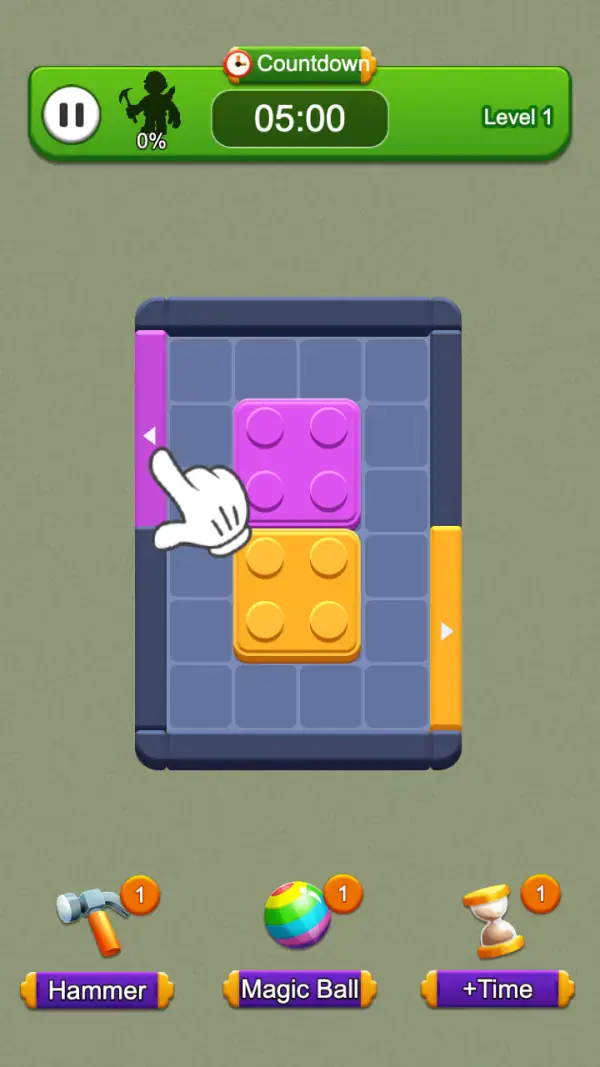
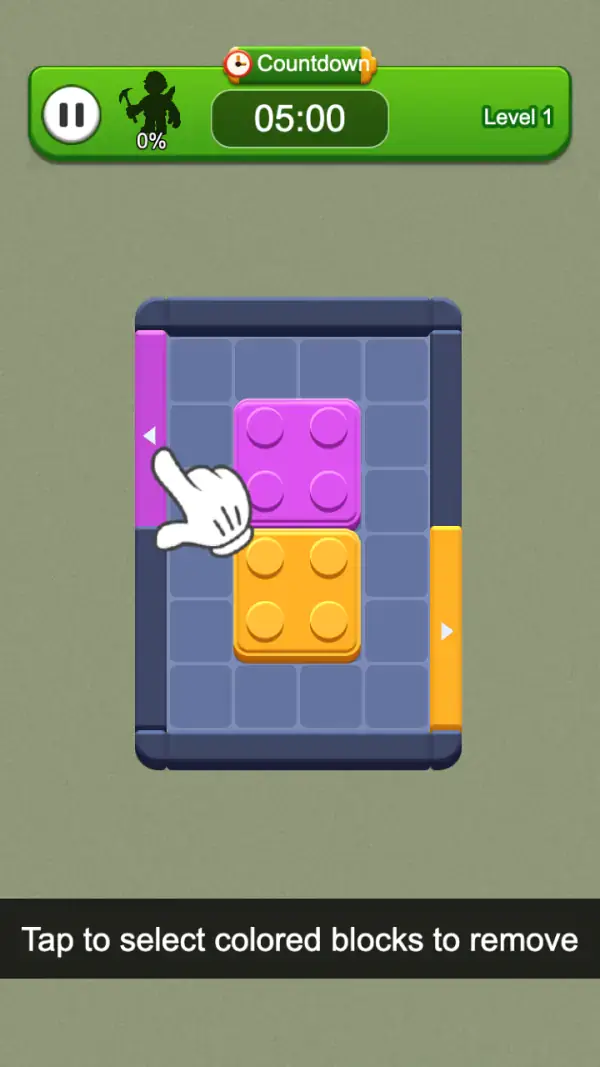
The game explains itself in a caption bar: "Tap to select colored blocks to remove" (frame 3). That is the whole verb. The tray in the middle is a grid of studs-topped bricks — a purple 2×2 stacked over an orange 2×2 in the first board — sitting in a dark frame, and the task is to get them off it (frames 1–3).
What makes it more than a tap-fest are the two racks on the sides of the tray: a purple strip down the left edge with a small left arrow, and an orange strip down the right with a right arrow (all frames). They match the two brick colours exactly, and the tutorial hand walks from a block to its same-coloured strip, so they read as destinations — though no frame shows a rack filling up or rejecting a colour.
The top bar is a green HUD with a pause button, a character silhouette over "0%", a "Countdown" pill reading 05:00, and "Level 1" at the right (all frames). Below the tray, three tools each show a count badge of 1: Hammer, Magic Ball and +Time (frames 1–2). It is the only game in our puzzle set with a hard clock on the first board.
Gameplay screenshots
Captured from the build running on this page, not promotional art. Every claim in the guide above names the frame it comes from.
How to Play
- Start by reading the two side racks and the colours on the tray, since the racks name the colours in play (frames 1–2).
- Tap a block to select it, as the caption instructs: "Tap to select colored blocks to remove" (frame 3).
- Work the purple block first on the opening board: it sits directly above the orange one, so it is the one the tutorial hand points at (frame 1).
- Keep an eye on the 05:00 countdown while you plan; a perfect read that arrives after the clock is a loss.
- Spend +Time before the last thirty seconds rather than after, since it is worth nothing once the countdown has already run out.
- Use Hammer on a single block that is wedged under something you cannot yet clear, and keep Magic Ball for when the tray has more colours than the racks can take.
A five-minute countdown from the first tap
The "Countdown" pill shows 05:00 on every frame we captured, including the tutorial frame (frames 1–3). Levels here are bounded by time rather than by a move allowance, which changes the feel completely: reading the board is worth less than deciding quickly, and the "+Time" tool exists precisely because the clock is the thing that ends runs.
Side racks match the block colours
The purple strip on the left and the orange strip on the right line up with the two brick colours on the tray (frames 1–2). The tutorial hand taps a purple block and then moves to the purple strip, which is the game demonstrating the pairing. Which colour you can act on is therefore tied to a side, not to whatever looks satisfying — how much room each side holds is not shown on any frame.
Three tools, one charge each
Hammer, Magic Ball and +Time each carry a badge reading 1 at the start (frames 1–2). They are limited stock rather than a menu — and +Time is the only one that addresses the countdown directly.
Tips & strategies
- The "0%" beside the character silhouette is the only progress readout on screen. It is a percentage of the level, and it is at zero on every frame we captured.
- Rack space is the constraint to watch. No frame shows a rack full, so the first thing to learn is how much each side takes before it refuses more.
- You begin with one charge of each tool. Using all three on the first board means having nothing for the boards that actually need them.
- Because the clock starts immediately, tapping around the interface to look for a "ready" button just burns the 05:00.
- Level 1 is two blocks. Later trays stack more colours, and the arrows on the racks are the only on-screen hint of which side is taking what.
Where players go wrong
- Assuming it is a relaxed sort puzzle. It is the one game in this category with a countdown running on the very first board.
- Selecting a block whose colour has nowhere left to go — the tap does nothing useful and the clock does not stop.
- Treating the tools as unlimited. Each badge says 1.
Playing on phone, tablet and desktop
Portrait, with the tray in the upper-middle and the three tools along the bottom edge — thumb reach is fine on a phone. The HUD bar is tall, so on a small screen the tray itself is narrower than it looks in these captures. Keyboard is not used on any captured frame; pause is a button, not a key.
Frequently Asked Questions
Is Chroma Jam a match-3?
No. The in-game caption says "Tap to select colored blocks to remove" (frame 3) — blocks are removed by colour and sent to the matching side rack, not by lining three up.
Is there a time limit?
Yes, and it is on screen from the first frame: the "Countdown" pill reads 05:00. The "+Time" tool is there to extend it.
What are Hammer, Magic Ball and +Time?
The three tools under the tray, each starting with a single charge. +Time adds to the countdown; the other two clear blocks. Their exact reach is not demonstrated in the frames we captured.
What do the purple and orange strips on the sides mean?
They are colour racks — purple on the left, orange on the right — each with an arrow pointing at the tray, and each matching one of the two brick colours. The tutorial hand moves from a purple block to the purple strip, which is as far as the captured frames go in explaining them.
What is the 0% next to the character?
A percentage readout in the green HUD bar, sitting between the pause button and the countdown. It is still 0% on every frame we captured, so we can only say it is the level's progress indicator, not what it counts.