About Puzzle Yarn Fun
Wind coloured yarn between posts until every post carries a single colour, with an on-screen guide grid that tracks the board from 0%.
A colour-ordering puzzle played on a board of yarn-wound posts, with a knit-textured guide grid that starts at 0% — not the match-3 its catalogue blurb claims, and there is no cat anywhere on screen.
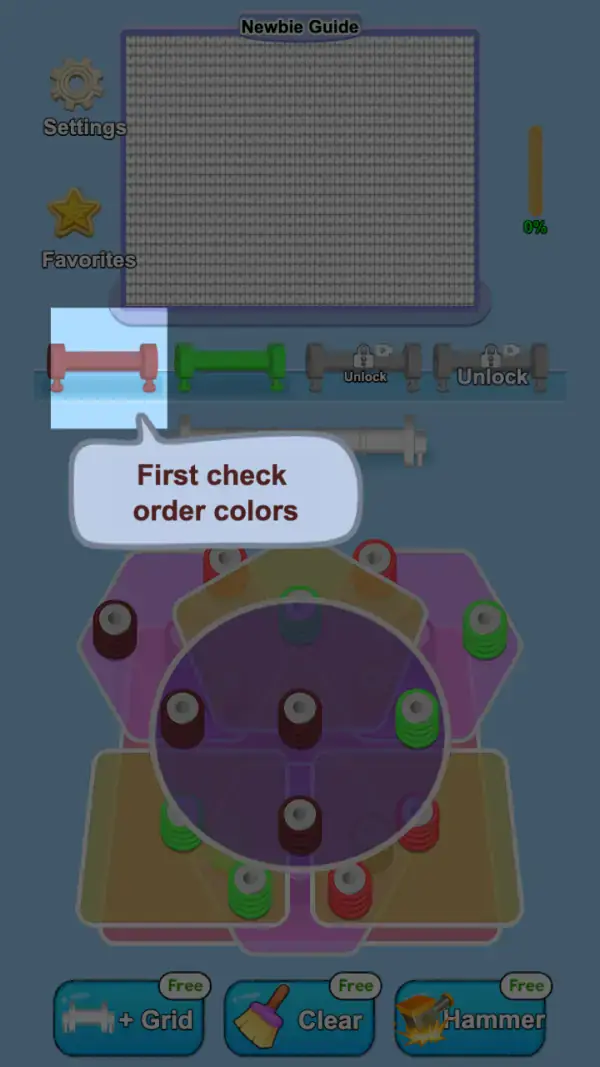
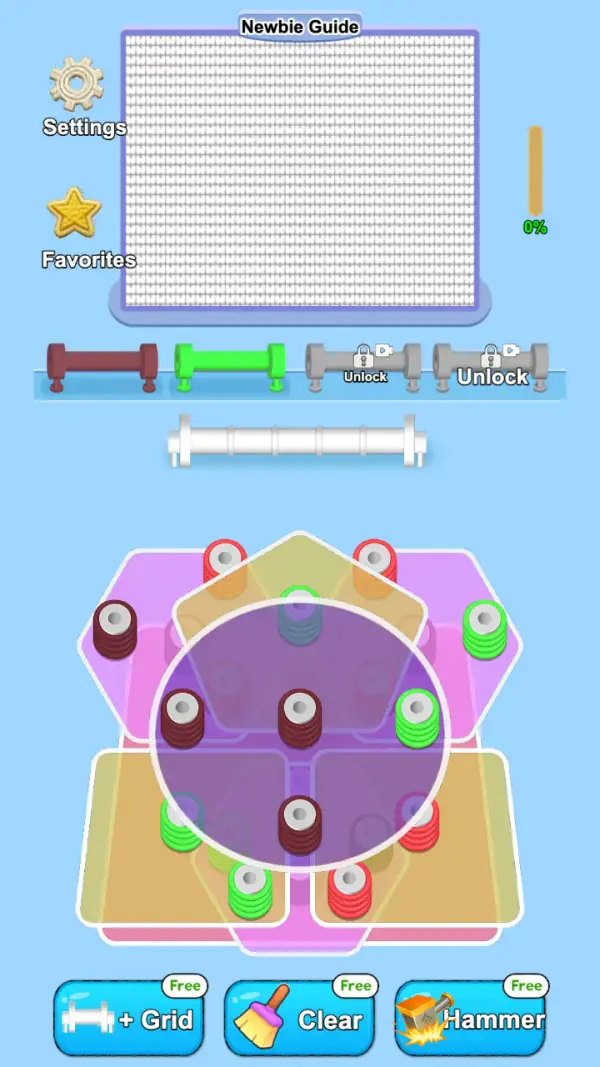
The first thing the game tells you is not about matching. A speech bubble points up at the row of spools and reads "First check order colors" (frame 1), and that is the correct framing for the whole puzzle: you are handing yarn back in a required order, not hunting for lines of three. Under the bubble the board is a cluster of overlapping coloured plates — magenta, sand-yellow and purple — each carrying short posts wound with maroon, green, red or grey-blue yarn (frame 2).
Above the board sits a panel titled "Newbie Guide": a large grid of knit stitches, empty in both frames, with a thin orange gauge beside it reading "0%" (frames 1–2). That grid is where progress is recorded. Neither frame shows a score, a move counter or a clock, which is why the game plays slowly and patiently — the percentage is the only thing on screen that reports how you are doing.
Four spool lanes run under the guide panel. Two are loaded, one dark red and one green, and two are greyed out with a padlock, a video badge and the word "Unlock" (frames 1–2). Below them is an empty white rail split into five short sections — the only other container on the screen, and nothing is on it in either frame. Along the bottom edge are three tools, each carrying a green "Free" badge: "+ Grid" (a rack icon), "Clear" (a broom) and "Hammer" (frame 2). Settings and Favorites sit top-left, so the entire game is reachable with one thumb in portrait.
Gameplay screenshots
Captured from the build running on this page, not promotional art. Every claim in the guide above names the frame it comes from.
How to Play
- Read the two open spool lanes before touching anything. The game's own first lesson is "First check order colors" (frame 1).
- Tap a yarn post on the board. Which container receives it is not labelled on screen, so treat the first few taps as the tutorial: one post, then watch what changes.
- Work the lane colours in the order they appear, and ignore the lanes marked "Unlock" until they open.
- Keep track of how many posts of each colour are still on the board — with only two lanes open, a colour you cannot hand over is the one that has to wait.
- Watch the "0%" gauge beside the Newbie Guide rather than how tidy the board looks; the gauge is the only progress the screen reports.
- Save Hammer for a single post that is blocking a colour the lanes are asking for, and Clear for a board that has genuinely run out of moves. Both are badged "Free", so neither costs anything you can see.
The lanes set the order
The tutorial points at the spool lanes, not at the board, and says to check colour order first (frame 1). Read that as the rule of the puzzle: the lanes show which colour the game wants next. Two lanes are open at the start and two sit behind "Unlock", so the number of colours in play grows as you go rather than being there from the first tap.
What the purple disc is
A large translucent purple circle, outlined in white, covers the middle of the board and four or five posts sit inside it (frame 2). No frame says what the circle means — it is either a highlighted region the tutorial wants you to look at or a working area, and we are not going to guess which. What is visible is that posts inside it are the same objects as posts outside it.
Three tools, all badged Free, and no wallet
"+ Grid", "Clear" and "Hammer" each carry a green "Free" badge (frame 2), and no coin balance appears anywhere on either frame. "+ Grid" and "Clear" name their targets plainly enough — the grid panel above, and the board — while what a Hammer press removes is not visible in any frame we took, so treat it as a single-post undo rather than a promise.
Tips & strategies
- The lane order is the whole game. Before tapping, name the colour the leftmost open lane wants and find the nearest post carrying it.
- There is no timer and no move counter on either captured frame, so a stalled board costs nothing but the look. Take it.
- Because the tools are badged "Free" and no wallet is visible, reaching for one early is cheap — but "+ Grid" affects the panel above, not the board, so it will not unstick a bad lane.
- Two lanes are locked at the start. Boards that only ever ask for two colours are teaching the habit; the third and fourth are what make later layouts hard.
- If the same colour keeps appearing on opposite sides of the plate cluster, clear the side that has more of it — posts on the same plate tend to open together.
Where players go wrong
- Expecting a match-3. There is no swap gesture and no line of three anywhere in the captured frames; the ordering instruction is the entire game, and the catalogue blurb about cats and combos does not describe this build.
- Ignoring the two "Unlock" lanes and assuming the board is broken because a colour has nowhere to go — that colour is waiting for a lane you have not opened yet.
- Skipping the tutorial bubble. It is one line and it is the rule.
Playing on phone, tablet and desktop
Portrait, and built for one hand: Settings and Favorites top-left, the guide panel across the top third, the lanes and rail in the middle, the board below them and the three tools along the bottom edge. Nothing on either captured frame shows a keyboard control, so on desktop everything is a click where it is a tap on a phone.
Frequently Asked Questions
Is Puzzle Yarn Fun a match-3 game?
No. The captured frames show a colour-ordering board with a one-line tutorial about checking colour order, a knit-stitch guide grid sitting at 0% and four spool lanes. There is no swap mechanic and no three-in-a-row anywhere on screen, and no cat character appears either.
What do + Grid, Clear and Hammer do?
They are the three tools along the bottom of frame 2, each badged "Free". The names point at the grid panel and at the board. What a Hammer press specifically removes is not shown in the frames we captured, so we are not going to invent it.
Why do two spool lanes say Unlock?
Only two lanes are loaded in the first board. The other two are greyed with a padlock and a video badge in both frames, so the puzzle adds colours as you progress instead of starting with all four.
Is there a time limit?
Nothing on the captured frames counts down. The only gauges are the "0%" bar beside the Newbie Guide and the board itself, so you can leave a board alone while you think.
Does it need an account?
No. There is no sign-up anywhere on Tapzens. Progress is stored by the game in your own browser, which is also why clearing site data or switching devices starts over.