About Puzzle Hex
Move hex nuts between threaded bolts until every bolt carries a single colour, with an undo and an extra-nut boost both behind rewarded videos.
A bolt-and-nut sorting puzzle: hex nuts have to be moved between threaded bolts until each bolt carries one colour, with an undo and an extra-nut boost both behind rewarded videos.
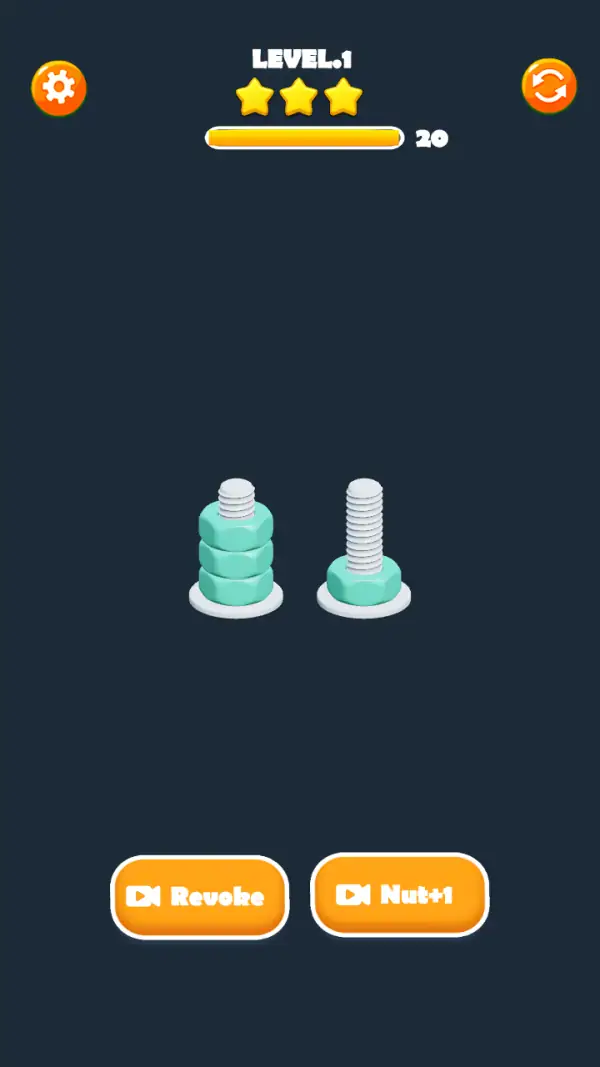
The name is about the nut, not the board. Level 1 is two steel bolts standing on washers, one carrying three teal hex nuts and one carrying a single nut at its base (frames 1–2). Nothing else is on screen. The task in this genre is to shuffle nuts between bolts so that every bolt ends up loaded with one colour only, and the first level is a single colour — it exists to teach the move, not to test it.
The header is a plain dark panel: "LEVEL.1" centred, three gold stars under it, and a yellow bar with the number 20 beside it (both frames). A gear button sits top-left and an orange circular-arrow restart top-right. The number 20 is the only counter on screen and it read the same on both frames we captured, including after the taps that drove the sweep — so treat it as the level budget rather than a clock, and note that we never saw it move.
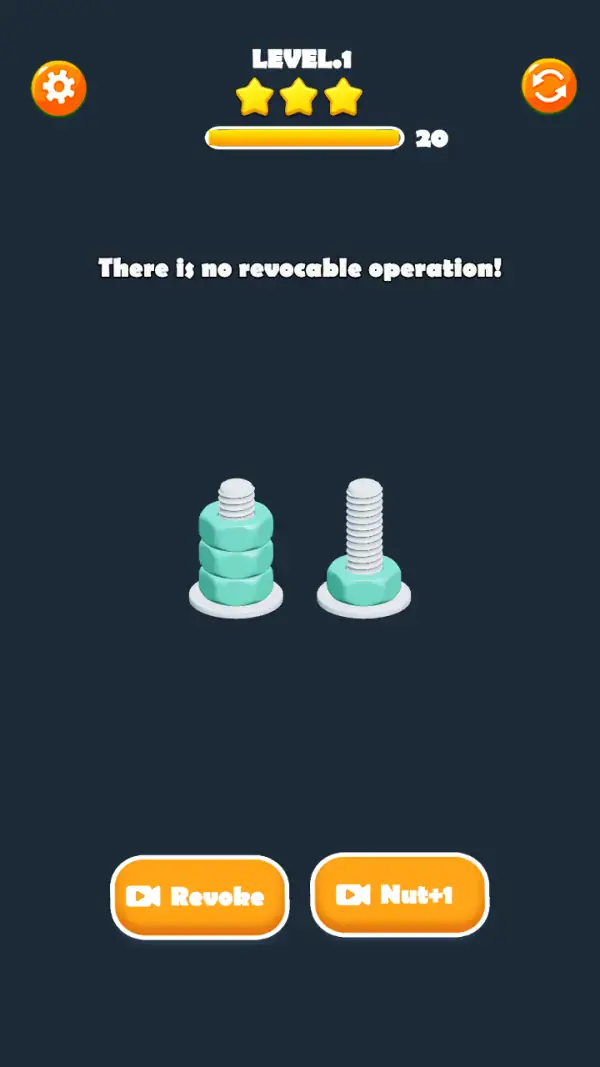
Along the bottom are two orange buttons, each badged with a video-play icon: "Revoke" and "Nut+1" (both frames). Pressing Revoke with nothing to undo produces the game's own toast, "There is no revocable operation!" (frame 2) — which is the clearest confirmation in the whole set of what that button is for.
Gameplay screenshots
Captured from the build running on this page, not promotional art. Every claim in the guide above names the frame it comes from.
How to Play
- Start by counting bolts and free space. On Level 1 there are two bolts and one of them has room (frames 1–2).
- Tap a nut to lift it, then tap the bolt you want it on. Only the top nut of a stack can move, so the order you clear a bolt matters.
- Never move a nut onto a bolt unless it either matches the nuts already there or the bolt is empty.
- Keep one bolt free as a parking space for as long as you can; a board where every bolt is occupied has usually lost.
- Use Revoke the moment a transfer turns out to be wrong — the undo history is short, so the earlier you use it the more it is worth (frame 2).
- Restart with the orange arrow at the top-right rather than grinding at a dead board; the level budget shown as 20 does not move on its own.
Bolts are the only storage
Nuts live on bolts, and a bolt holds a stack. In a sorting puzzle of this shape the number of bolts and the height of each stack are the entire constraint: you can only park a nut somewhere that has room and will take its colour, so counting free bolt space matters more than looking at the nuts themselves.
Revoke is an undo, and it is ad-funded
The button carries a video-play icon (frames 1–2), and the toast "There is no revocable operation!" appears when the undo history is empty (frame 2). It rewinds a move rather than clearing a region, which makes it the cheapest way out of a wrong transfer.
Nut+1 buys room
The second rewarded button, "Nut+1" (both frames), is the game's pressure valve: when no bolt can accept a nut, the usual fix in this genre is to gain an extra nut position somewhere on the board. We did not capture the result of pressing it, so we are describing what the label offers rather than what it does.
Tips & strategies
- The three stars at the top are gold before a single move has been made (frame 1). In this shape of game they mark the thresholds you are scored against, not how hard the board is.
- Single-colour early levels are teaching the lift-and-place gesture. Do not expect the sorting problem to appear before the board has two colours on it.
- Both bottom buttons cost a video, so a board you can undo your way out of is worth more than a board you boost your way out of.
- The gear at top-left is settings; the orange arrow is restart. They are the only two non-game buttons on the screen.
Where players go wrong
- Filling the last empty bolt early. Once no bolt is free, a wrong-colour nut on top of a stack has nowhere to go.
- Pressing Revoke out of habit — with an empty history it does nothing and says so.
- Reading the "20" as a countdown. It did not change between our two frames.
Playing on phone, tablet and desktop
Portrait with a very sparse layout: the header strip at the top, the bolts in the middle band and the two boost buttons at the bottom, leaving a lot of dark space around the board. That empty middle is where the genre puts more bolts as levels grow, so the pieces stay thumb-sized on a phone even on busy boards. No keyboard control appears on any captured frame.
Frequently Asked Questions
Is Puzzle Hex a hexagon tile puzzle?
No. The board is threaded bolts with hex nuts on them — the "hex" is the nut shape. The captured frames show two bolts and four nuts and nothing resembling tiles or a circuit.
What does Revoke do?
It undoes your last move. The game confirms this itself: pressing it with nothing to undo shows the toast "There is no revocable operation!" (frame 2). It carries a video icon, so it is a rewarded action.
What is Nut+1?
The second rewarded button on the bottom row. It offers an extra nut position when a board has run out of room; the exact effect is not shown in the frames we captured.
What is the number 20 at the top?
A counter beside the yellow bar under the stars. It read 20 on both frames we took, including after input, so it behaves like a level budget rather than a timer.
Why does Level 1 only have one colour?
It is the tutorial board. With a single colour there is exactly one thing to learn — lifting a nut from one bolt and placing it on another — which every later level then builds on.