About Spin Screw Jam
Take coloured screws out of overlapping plates and get each colour into its matching box, using a short buffer rail you can extend.
A screw-sorting puzzle: unscrew coloured screws from overlapping plates and get each colour into its matching box, with a short buffer rail you can extend.
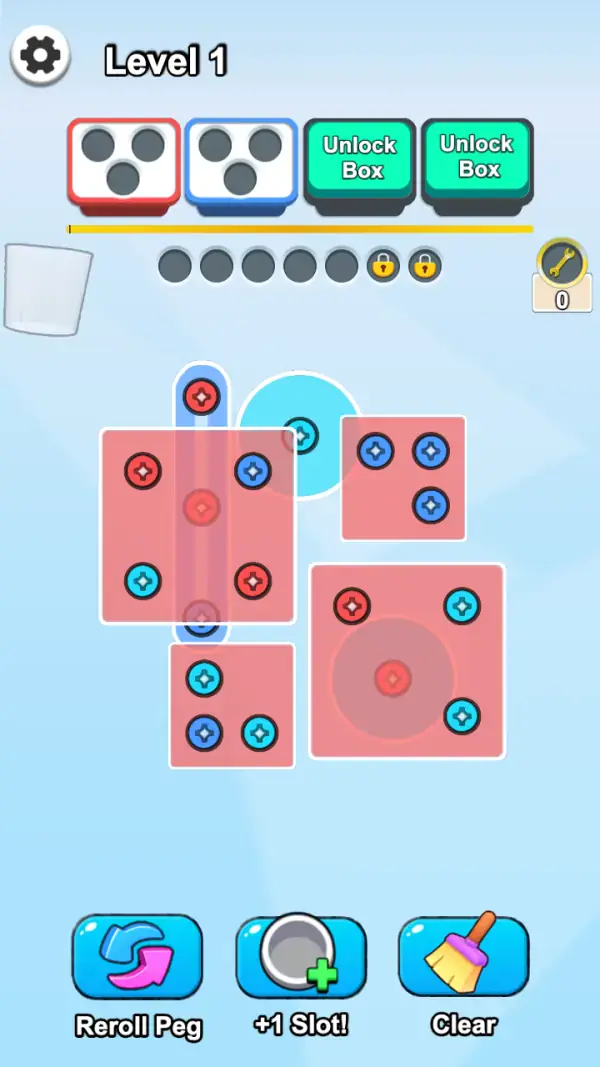
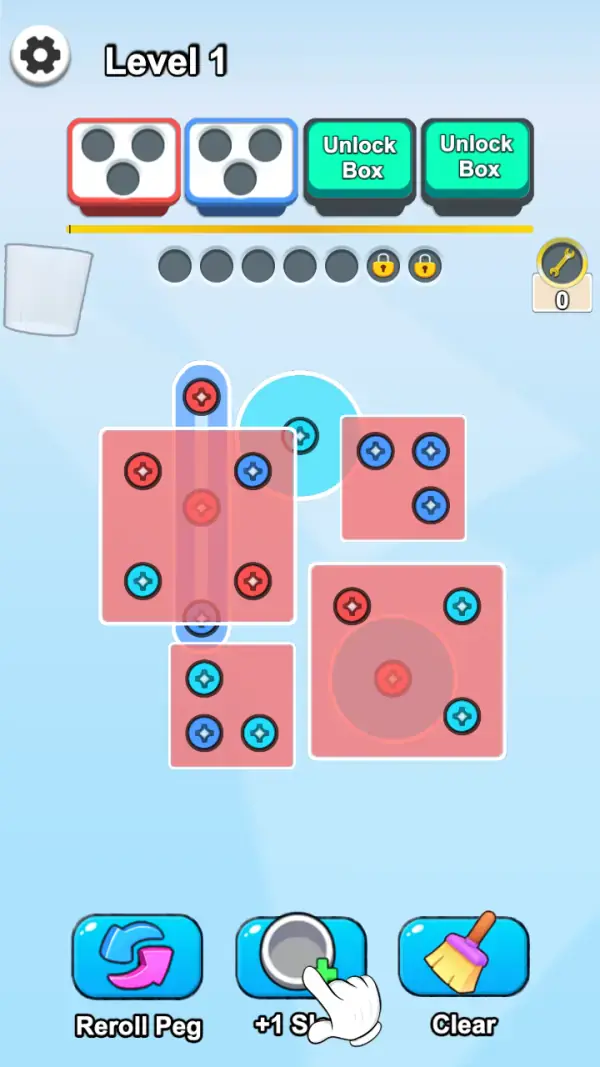
The board is a stack of salmon-pink plates — squares and round washers, overlapping each other — held down by cross-head screws in red, blue and cyan (frames 1–2). Take a plate's screws out and the plate lifts, exposing what was under it. The point is not the plates though; it is where the screws go.
Along the top, under "Level 1", sit the destinations: a red-outlined box with three holes, a blue-outlined box with three holes, and two teal buttons reading "Unlock Box" (frames 1–2). A screw only belongs in the box of its own colour, and each box has three holes, so the sorting has to be exact rather than approximate.
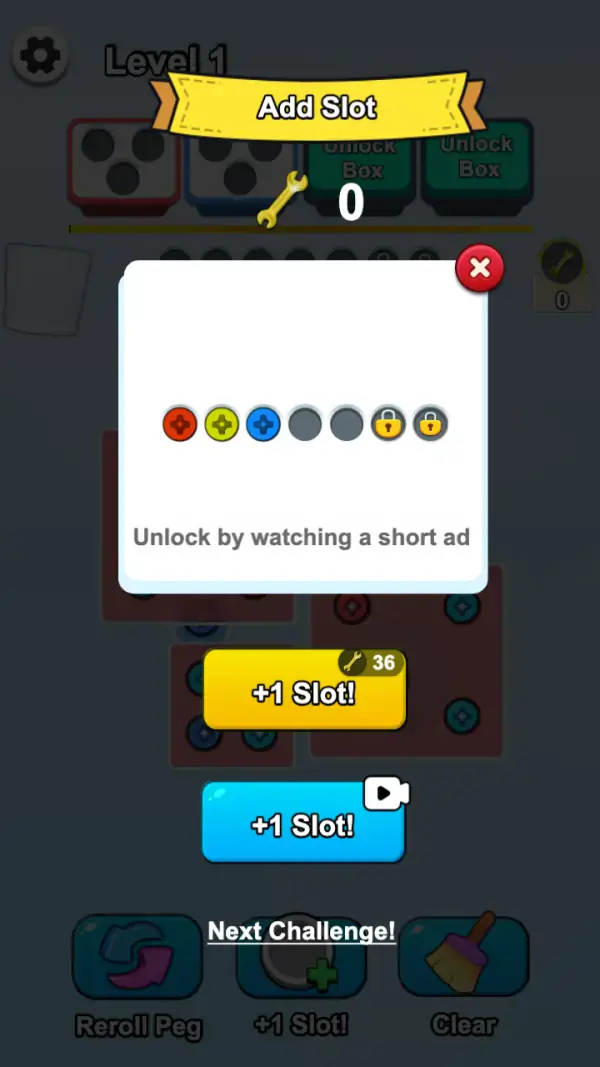
Between the boxes and the board is a rail of seven grey circles — five open and two padlocked at the right end (frames 1–2). That is the temporary buffer: the screws you have removed but cannot yet file. To the right of it sits a wrench icon over a small tally reading 0 (frames 1–2), which is the currency the rail upgrade asks for. Tapping "+1 Slot!" opens an "Add Slot" panel showing the same seven positions — three already carrying a red, a yellow-green and a blue screw, two empty, two padlocked — above the line "Unlock by watching a short ad", with two buttons below it: a yellow "+1 Slot!" badged 36 with that same wrench, and a blue "+1 Slot!" carrying a video icon (frame 3).
Gameplay screenshots
Captured from the build running on this page, not promotional art. Every claim in the guide above names the frame it comes from.
How to Play
- Look at which boxes are open first. On the first board only red and blue are available, so cyan screws have nowhere to be filed (frames 1–2).
- Unscrew a screw only when its box has a free hole, or when you have buffer space to hold it.
- Work the topmost plates first — a plate that is covered cannot lift no matter how many screws you take out of its neighbours.
- Count the buffer rail before you commit. Five open circles is the whole working memory of the puzzle on the first board.
- Use Reroll Peg when nothing on the board is both exposed and wanted, rather than tapping plates hoping one frees.
- Spend the "+1 Slot!" unlock on boards where you keep hitting the rail limit, not on the first board you feel stuck on.
Colour-matched boxes with three holes each
The red and blue boxes at the top take three screws apiece, and two more boxes are locked behind "Unlock Box" (frames 1–2). Because a wrong-colour screw cannot be filed, the boxes act as the acceptance test for everything you remove.
A seven-circle buffer, five of them yours
The rail of grey circles is where removed screws wait. Five are open and two are padlocked at the end (frame 1); the "Add Slot" panel spells out that the locked ones come from watching an ad, and prices the other route at 36 wrenches against a balance of 0 (frame 3). Buffer space is the difference between being able to lift a plate now and having to wait for a colour to clear.
Reroll Peg, +1 Slot! and Clear
Three tools sit along the bottom: "Reroll Peg" with a circular-arrow icon, "+1 Slot!" with a grey slot and a green plus, and "Clear" with a broom (frames 1–2). They are the pressure valves — a reshuffle when no plate is free, an extra buffer slot when the rail is full, and a sweep when the board has stalled. None of the three shows a price on the board itself.
Tips & strategies
- A screw sitting on a covered plate still counts against you — you can see its colour and plan for it.
- The two padlocked buffer slots and the two "Unlock Box" buttons are the same idea at different places: the game starts you small and grows the puzzle by opening them.
- The upgrade currency is the wrench, not the coin. Its tally reads 0 on the board frames and the paid "+1 Slot!" asks for 36 (frame 3), so the video route is the one available immediately.
- The "Add Slot" panel shows a yellow-green screw as well as red, blue and cyan (frame 3) — the first board only uses three of them, so more colours are coming.
- "Next Challenge!" appears above the tool row once a board is finished (frame 3) — the levels run one after another rather than through a map.
Where players go wrong
- Pulling screws out to see what is underneath. Every screw you lift has to live in the buffer until its box has room.
- Ignoring the locked boxes. If cyan has nowhere to go, cyan screws are dead weight.
- Unlocking a buffer slot the first time the rail fills, instead of noticing that the real problem was a colour with no box.
Playing on phone, tablet and desktop
Portrait. The boxes and buffer rail are at the top and the tools at the bottom, with the board between them, so the whole puzzle is visible at once on a phone without scrolling — which matters here, because the buffer rail has to stay in view while you plan. Nothing on the captured frames uses keyboard input.
Frequently Asked Questions
What is the goal of each board?
Get every screw off the plates and into the box of its own colour. The boxes have three holes each, and the buffer rail holds the ones you cannot file yet.
Why are two boxes labelled "Unlock Box"?
They are extra destinations that are not available at the start. The first board only gives you a red and a blue box (frames 1–2).
How do I get more buffer slots?
The "Add Slot" panel offers two ways: a yellow "+1 Slot!" button badged 36 with the wrench icon, or a blue "+1 Slot!" button with a video icon, captioned "Unlock by watching a short ad" (frame 3). The last two positions on the rail are padlocked until you do, and the wrench tally read 0 on our frames.
What does Reroll Peg do?
It is the reshuffle tool on the bottom row (frames 1–2). It is there for the state where no plate on the board is both exposed and wanted. How it rearranges the board is not shown in our frames.
Is there a timer?
No countdown appears on any captured frame. The pressure in this one comes from the five open buffer circles rather than from the clock.